
Reviewed · SYDNEY
Australia and New Zealand eSIM (3 to 30 days. Up to 45GB)
Your phone can run the trip, not you. This Australia and New Zealand eSIM idea is simple: buy once, activate by QR, then use mobile data at local rates across both countries. The plan is built for everyday things like staying in touch and using maps without hunting for a physical SIM.
I like two things most. First, you get the eSIM by email, so you avoid the classic airport SIM routine and the language or counter lines that come with it. Second, you get 4G/5G data where available for the time you select, with options from 3 to 30 days.
One thing to consider: getting the eSIM set up can take some time, and it may feel a bit fiddly. Do the activation before you land, and double-check eSIM compatibility (if you are unsure, email Xplori in advance).
In This Review
- Key Things I Think You’ll Care About
- What This eSIM Actually Does for Your Trip
- Price and Value: Why $5 Can Be More Than a Deal
- Coverage Across Australia and New Zealand (One Plan, No Swap)
- How Activation Works: QR Code to Connected in Minutes
- Data Quality and Speed Limits: 4G/5G First, Then 3G
- Using It Day to Day: Navigation, Contacts, and Peace of Mind
- Phone Compatibility: The One Requirement You Must Not Skip
- Support From Xplori: Helpful, Remote, and Included
- “It Ends Back at the Meeting Point” Means Nothing Here
- Who This eSIM Fits Best (And Who Should Skip It)
- Tips to Make Setup Stress-Free
- Should You Book This eSIM?
- FAQ
- How long is the Australia and New Zealand eSIM valid?
- How much data do I get?
- Does this eSIM work in both Australia and New Zealand?
- How do I receive the eSIM?
- How do I activate the eSIM?
- What phones are compatible with this eSIM?
- What happens if I use up the high-speed data?
- Can I cancel and get a full refund?
Key Things I Think You’ll Care About
- Email delivery and QR activation: you start with a message, then scan a code to activate.
- Works in two countries: the data plan covers both Australia and New Zealand.
- Flexible length options: choose 3 to 30 days based on your trip.
- Local-rate data with speed limits: 4G/5G where available, then 3G after the high-speed cap.
- Support by email from Xplori: remote customer service is included.
- Only for eSIM-capable phones: you need a device that supports eSIM to use the product.
What This eSIM Actually Does for Your Trip
This is not a guided excursion with meeting spots and scenic stops. It is a connectivity tool for your own schedule. The goal is to keep your phone useful the second you arrive in Australia and then again when your plans include New Zealand.
If you’ve ever tried to navigate a new city on sketchy Wi-Fi, you already get the value here. Having your own data plan means you can pull up directions, translate signs, and message home without doing a half-day ritual of finding a connection.
You also get the “calm factor.” Instead of guessing whether airport counters are open, whether staff speak your language, or whether you’ll accidentally buy the wrong SIM type, you start the process at home. That matters, especially when your first day is all logistics.
Price and Value: Why $5 Can Be More Than a Deal
The price is $5.00 per person. That’s the headline. The real value is what you do not pay in time and hassle.
Airport SIMs can be expensive, and they often come with friction: lines, late hours, and the stress of picking a plan under pressure. With an eSIM delivered by email, you remove most of those friction points. You also avoid the awkward moment of explaining your phone model to a counter worker right when you’re tired from travel.
Now, be smart about the “up to 45GB” part. High-speed data is capped, then speed switches to 3G after you use the included amount. That is fine for many travelers, but it is not for people who plan to stream nonstop in high definition or upload large files every day. If your usage is mostly maps, messaging, and occasional photos, you’ll usually feel the value quickly.
If you are traveling with someone, it also scales well. Two people who both need navigation and contact back home can end up paying far less than many typical airport setups.
Comparing before you commit? These cover similar ground in Sydney:
- Sydney: Opera House Guided Tour with Entrance Ticket★ 4.8 · 8,312 reviews
- All Inclusive Blue Mountain,Scenic World,Lunch,Koalas,ferry★ 5.0 · 7,832 reviews
- From Sydney: Blue Mountains Full-Day Trip★ 4.5 · 4,471 reviews
Coverage Across Australia and New Zealand (One Plan, No Swap)
This plan covers both Australia and New Zealand. That matters if your trip includes both countries, even if you only spend a few days in one of them.
The big win is not just convenience. It’s continuity. When you do not have to swap SIMs, you avoid the risk of losing service at the wrong moment. You also avoid the “wait, is my phone actually unlocked, and do I need to restart it” stress.
In practical terms, you can keep using the same mobile data profile for the whole journey. That is especially helpful when you are hopping between cities and trying to keep schedules straight.
How Activation Works: QR Code to Connected in Minutes
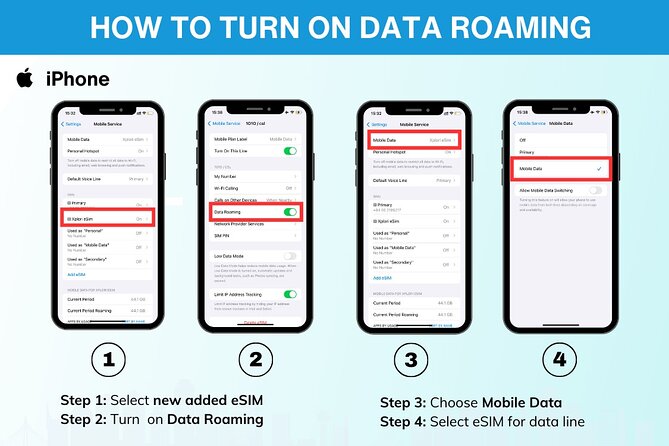
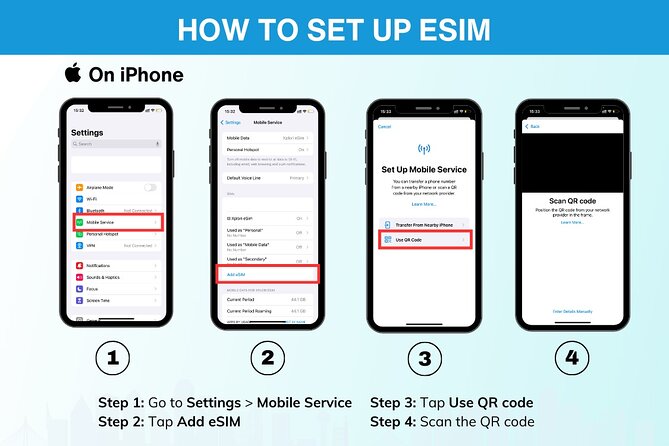
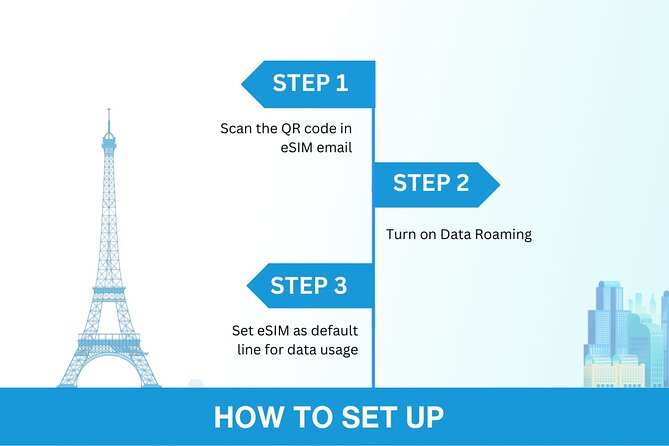
The process is straightforward on paper: you receive the eSIM by email after ordering, then activate it by scanning the unique QR code. Activation is described as taking minutes, but your real-world timing depends on your phone and how quickly your device guides you through the steps.
Before you touch anything on departure day, do these two things:
- Check your phone supports eSIM.
- Find a quiet moment to scan the QR code and complete setup.
The product instructions specifically recommend confirming compatibility and contacting Xplori ahead of time if you are unsure. That’s a smart move, because eSIM setup problems are usually device-related, not “the plan is wrong.”
Also, give yourself a small buffer. One of the strongest points from the experience feedback is that installation can take time and may be a bit difficult. That doesn’t mean it fails, but it does mean you should not plan to do it in the chaos of landing, immigration, and finding your transport.
Data Quality and Speed Limits: 4G/5G First, Then 3G
Here’s the deal with the data. You get 4G/5G data (where available) for the duration of your plan, up to the mentioned high-speed limit (up to 45GB). After you hit that cap, your speed switches to 3G.
This is important for expectations. Many travelers expect “unlimited fast data.” This is not that. But it can still be a great deal because 3G is usually enough for directions, messaging, and basic browsing. The key is that you should not get stranded without data entirely.
Think of it like this:
- High-speed time is for your “I want it now” moments: uploads, video calls, heavy map use.
- 3G time is for staying connected and planning.
If you treat the high-speed portion as your main utility and save big bandwidth tasks for Wi-Fi when possible, the plan typically works well for real travel life.
Another way to fill the same day out of Sydney:
- Blue Mountains Small-Group Tour from Sydney with Scenic World,Sydney Zoo & Ferry
★ 5.0 · 3,709 reviews




Using It Day to Day: Navigation, Contacts, and Peace of Mind
The plan is designed for practical travel use. The stated purpose is to stay connected with friends and family and to find your way around town. That translates directly to the things you do every day in a new place.
With mobile data, you can:
- Use maps without detouring for Wi-Fi
- Send messages and check updates in real time
- Look up transit and opening hours when plans shift
You also keep a safety net. If your schedule changes, you can quickly confirm where you are supposed to be and how to get there next. That sounds basic, but it saves time and reduces mistakes.
And because it is local-rate data, the intention is that it feels like a normal mobile connection rather than a premium novelty. The whole point is to make your phone behave like it belongs to you, not like a temporary problem.
Phone Compatibility: The One Requirement You Must Not Skip
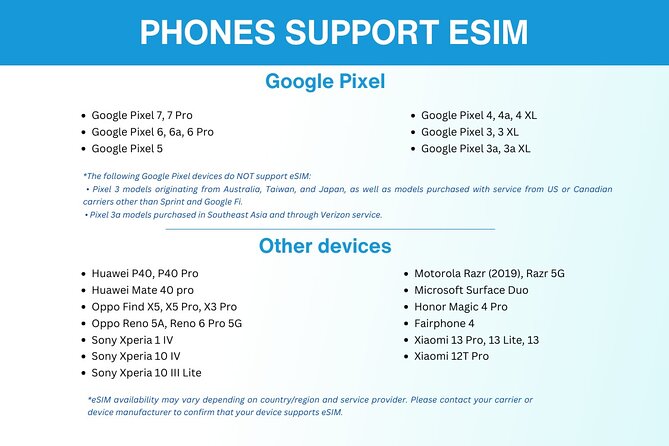
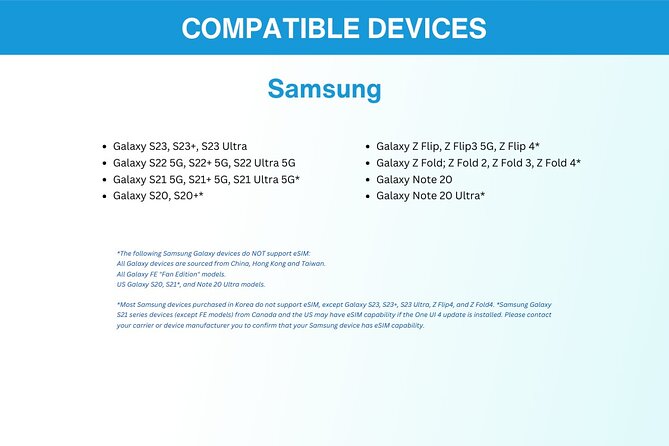
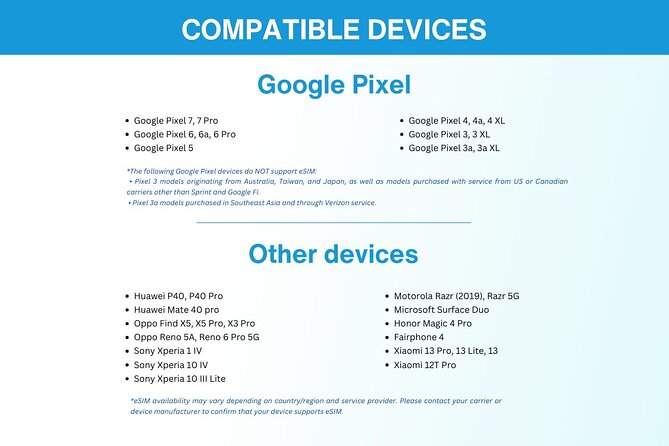
You need a phone that supports eSIM. The examples listed include iPhone XS and later, Pixel 3 and later, and Samsung S20, S21, and Fold models.
If your device is older or you are not sure, check before you buy. It is not worth arriving in Australia thinking you can just scan a QR code and magic will happen. eSIM is a device feature.
If you are uncertain, the experience includes a recommendation to contact Xplori in advance. Remote customer service is included, and that’s a strong backup when you want confirmation before you commit.
My practical tip: take 2 minutes at home and verify your phone settings show an option for adding an eSIM. That reduces stress later.
Support From Xplori: Helpful, Remote, and Included
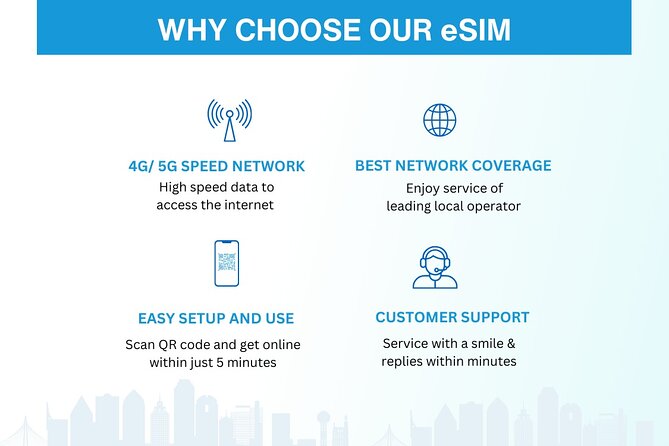
Remote customer service is included. You email for help. There is also a written English guide.
One piece of feedback that matters: support was described as very good, especially when installation feels difficult. That’s the scenario you want a help team for, because eSIM issues can be confusing when you are standing in a hotel lobby with spotty signal.
If you are the kind of person who likes answers fast, email support before departure is a good strategy. You can ask simple questions like whether your phone model supports eSIM, and you can clarify anything about activation steps.
“It Ends Back at the Meeting Point” Means Nothing Here
This product is digital. Still, the activity info shows a Sydney start location and an end back at the meeting point. In practice, that does not affect you much.
What matters is the email delivery and QR activation timeline. You are not meeting anyone on the street. You are activating a data profile on your phone.
So when you plan your days, think of it like a prep item. Once it is activated, the “experience” is just your phone working as intended.
Who This eSIM Fits Best (And Who Should Skip It)
This works best if you:
- Have an eSIM-capable phone
- Want one data plan for both Australia and New Zealand
- Prefer skipping airport SIM purchases
- Need reliable data for navigation and staying in touch
It is also a solid choice for short to mid trips because you can select the duration from 3 to 30 days.
You might want to look elsewhere if:
- You do not have an eSIM-compatible phone
- You plan heavy streaming and large downloads every day without Wi-Fi
- You cannot spare time to set up activation before travel
The speed cap matters. If you regularly burn through data fast, you may feel the transition to 3G. For many travelers, though, 3G still keeps the basics running.
Tips to Make Setup Stress-Free
A little prep goes a long way here.
1) Activate before your first day out
Do it while you have time and you are not juggling luggage, transport, and jet lag.
2) Keep the email and QR code handy
If you lose it, you create a new problem. Save it and maybe screenshot the instructions.
3) Expect it to take some time
Even when everything works, you might move through menus and prompts slowly.
4) Use Wi-Fi strategically
When you hit the high-speed cap, Wi-Fi can help you stretch the remaining plan comfort level.
5) If unsure, message Xplori early
They include remote customer service and are set up for questions.
Should You Book This eSIM?
Yes, if you meet the simple requirement: an eSIM-capable phone and a realistic understanding of the high-speed data cap. For $5, it’s a low-risk way to keep your phone functional across both Australia and New Zealand without dealing with airport counters.
Book it if you want day-one navigation help and an easy “activate by QR” process. It’s also a good fit for couples or small groups traveling together because you can handle two or more connections without multiplying airport hassles.
Hold off or plan extra carefully if your phone is not clearly eSIM-ready, or if your trip includes heavy bandwidth habits. In that case, you might want more clarity on how your usage matches the up to 45GB high-speed allowance.
FAQ
How long is the Australia and New Zealand eSIM valid?
You can choose a plan for 3 to 30 days, depending on how long your trip lasts.
How much data do I get?
The plan offers up to 45GB of data for the high-speed portion.
Does this eSIM work in both Australia and New Zealand?
Yes. The data plan covers both Australia and New Zealand.
How do I receive the eSIM?
You receive the eSIM by email after you order.
How do I activate the eSIM?
You activate it by scanning the unique QR code provided with your eSIM email. Activation is described as taking minutes.
What phones are compatible with this eSIM?
It requires a phone that supports eSIM. Examples provided include iPhone XS and later, Pixel 3 and later, and Samsung S20/ S21/ Fold.
What happens if I use up the high-speed data?
High-speed data is capped at the mentioned amount. After that, the speed switches to 3G.
Can I cancel and get a full refund?
Yes. There is free cancellation, and you can cancel up to 24 hours in advance for a full refund.
Latest Sydney additions
- Sydney: Surry Hills Private Food Tour with +8 Local Tastings
★ 5.0 · 1 review - Sydney: Hunter Valley Wine Tour – Choc, Dumplings & Oysters
★ 5.0 · 1 review - Private Transfer FROM Sydney Downtown to Sydney Airport 1-2 pax
★ 5.0 · 1 review - Sydney Harbour Melbourne Cup Cruise
★ 5.0 · 1 review - Sydney: Watsons Bay Walking Tour
★ 5.0 · 1 review - Sydney: Brewery, Winery, and Distillery Tasting Tour
★ 5.0 · 1 review - Sydney: City Hike with Opera Bar Lunch
★ 5.0 · 1 review - Overnight Harbour Cruise Experience
★ 4.0 · 1 review